
RepairSolutions2
Innova Electronics CorporationAuto & Vehicles
4.79.35K Reviews
- Version
- 2.7.5
- Installs
- 1.00M
- Age Rating
- Everyone
Screenshots
Our Review of RepairSolutions2
 Analysis by Appyee
If you've ever found yourself baffled by the mysterious lights on your car dashboard, then RepairSolutions2 might just be the app you didn't know you needed. As someone who's not exactly a car enthusiast, I can tell you that this app has been a game-changer for me. So, let's dive into what makes RepairSolutions2 stand out from the crowd.
Who benefits most from a car-code reader
I find this kind of tool most useful for a driver who wants to understand a warning before deciding what to do next. A dashboard light can be stressful, especially when the car still seems to drive normally. Reading a code can give you a more grounded starting point for a conversation with a repair shop, rather than leaving you to guess or search through unrelated advice online.
That does not make a diagnostic result a repair verdict. A code points toward a system or condition that needs attention; it does not necessarily identify one failed part by itself. My practical advice is to treat the explanation as a way to ask better questions, not as permission to replace a component without checking the cause. For a driver who already enjoys basic maintenance, that distinction helps keep a useful tool from becoming an expensive parts-guessing exercise.
Getting Started with RepairSolutions2
The first thing you need to know is that this app is designed to make the life of any car owner significantly easier. Once you download the app, available for both Android and iOS, you’ll need to pair it with a compatible OBD2 scanner. If you’re not familiar with what that is, don’t worry—I wasn't either! Essentially, it's a device that connects to your car’s computer system to read diagnostic trouble codes.
That scanner requirement is the first decision to make, because the app is not a stand-alone way to interrogate a vehicle. Before buying anything, I would check that the scanner is compatible with the app and suitable for the car I intend to use it with. It is also worth checking whether the particular vehicle and the issue at hand can provide the information I want; access to diagnostics can vary by car and system. If I only need a one-off code read, borrowing a compatible scanner or asking a repair shop to scan the car may be more sensible than purchasing equipment.
Setting up the app was pretty straightforward. After connecting the OBD2 scanner to my car, the app quickly synced with it via Bluetooth. I was amazed by how instantly it started pulling data from my car. Within seconds, I could see a list of diagnostic codes and what they meant. No more guessing why that pesky check engine light was on!
A calmer way to handle a warning light
In an everyday situation, I would use the app after parking somewhere safe, not while driving. I would connect the scanner, read the available code, and note the wording before doing anything else. If the car is running roughly, showing a warning that calls for urgent attention, or behaving in a way that feels unsafe, I would stop relying on an app and get appropriate help. A code reader can inform the next step, but it cannot make a risky vehicle safe to drive.
For a less urgent warning, the useful part is having a clearer account to take to a mechanic. I can describe the code and the symptoms I noticed, then ask whether the proposed repair addresses both. That is a better use of diagnostics than treating a suggested fix as a guaranteed answer. Keeping the vehicle details and symptoms together also helps me avoid mixing up what the app found with what I merely suspected.
A Deep Dive into the Features
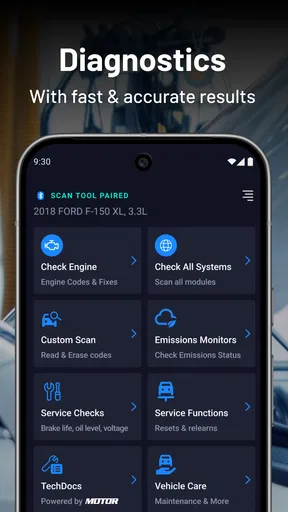
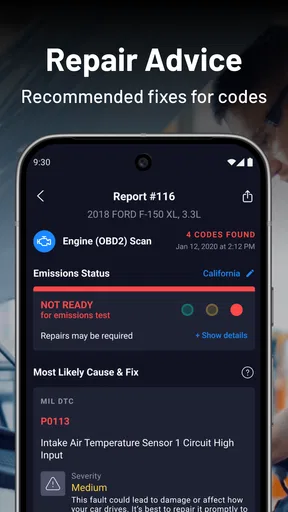
One of the most impressive features is the comprehensive database of diagnostic codes. The app doesn’t just throw technical jargon at you; it provides detailed explanations and even suggests potential solutions. This is incredibly helpful for someone like me who wouldn’t know an oxygen sensor from a fuel injector.
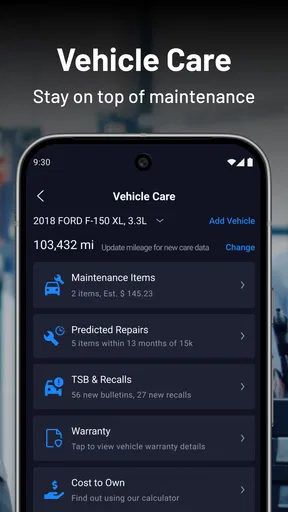
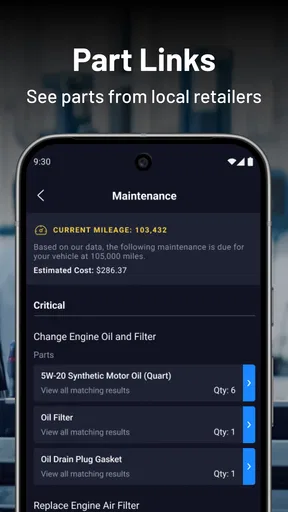
Another feature I found particularly useful is the maintenance schedule. The app keeps track of your car’s service intervals and sends you reminders for upcoming services. It’s like having a digital service advisor in your pocket. Plus, the app offers repair cost estimates, giving you an idea of what you might expect to pay before heading to the mechanic.
I would use a cost estimate as a conversation starter, not a quote to rely on. The final bill can depend on the actual diagnosis, local labor rates, parts, and what the mechanic discovers once work begins. Similarly, a maintenance reminder is most helpful when the vehicle information and service history are kept accurate. If I have recently had work done, I would check that my own records and any reminder schedule still line up rather than assuming an alert has accounted for every service.
For those who enjoy a bit of DIY, the app provides step-by-step repair videos and guides. I attempted a simple air filter replacement using one of these guides, and to my surprise, it was a success! The app made it easy to follow along, and I felt like a pro mechanic—well, almost.
I would draw a firm line between a straightforward task and a repair involving safety-critical systems, specialized tools, or uncertainty about the procedure. A guide can make instructions easier to follow, but it cannot confirm that a repair is within my abilities or that the car is safe afterward. For a first DIY job, I would choose something low-risk, read the instructions all the way through before starting, and stop if the steps do not match the vehicle in front of me.
Real-Time Insights and Performance Tracking
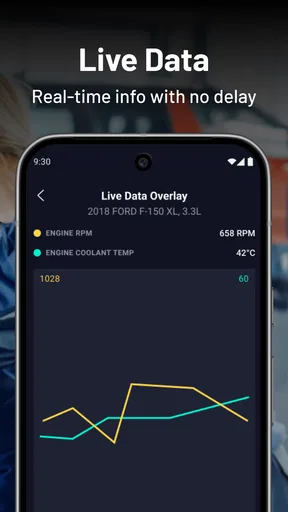
One of the coolest features has to be the real-time performance tracking. You can monitor your car’s performance metrics like fuel efficiency, engine load, and more. This feature is perfect for those who want to keep their car in top condition or even just satisfy their inner data geek.
For me, live readings are most valuable when I have a specific question in mind. Watching numbers without a reason can create more confusion than insight, and a changing value is not automatically evidence of a fault. I would compare readings under similar conditions and focus on whether they help explain a symptom, rather than trying to interpret every metric in isolation. Drivers who enjoy learning how their vehicle responds may appreciate that extra context; someone who only wants a quick warning-code check may never need to explore it.
The app also provides a vehicle health report, which is a detailed overview of your car's current condition. It’s incredibly reassuring to have such insights at your fingertips, particularly before a long road trip. Imagine avoiding a breakdown because you were proactive about a minor issue—pretty neat, right?
Before a trip, I would treat that report as one part of a basic check, alongside ordinary preparation such as looking for visible problems and making sure routine maintenance is current. A reassuring screen cannot guarantee that a vehicle will not develop trouble later, so I would not use it as a substitute for attention to unusual noises, warning lights, or changes in how the car drives. The benefit is a more informed starting point, not certainty.
Readability, navigation, and different ways of using it
In terms of user experience, RepairSolutions2 is intuitive and user-friendly. The interface is clean and easy to navigate, with all the features clearly laid out. I didn’t encounter any lag or glitches, which is always a plus. It's evident that a lot of thought went into making the app accessible for everyone, regardless of their technical know-how.
For a new user, the clearest path is to focus on one task at a time: connect the scanner, read the result, and then decide whether to explore explanations, maintenance, or repair guidance. That keeps the diagnostic screen from turning into a pile of unfamiliar terms. I also think it helps to read an explanation in a calm setting, rather than trying to interpret it at the roadside while dealing with traffic or time pressure.
People differ in how comfortably they read small text, follow visual instructions, or use a phone for a long session. I would make the screen easier to work with by using the phone’s own display and text settings where available, taking breaks, and asking someone else to review a result if that would help. The app’s straightforward organization can reduce the learning curve, but it does not remove the need to understand what a diagnostic term means or whether a suggested step is appropriate.
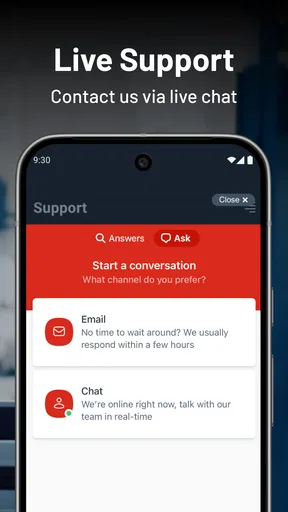
I also appreciated the customer support, which is available right from the app. I had a couple of questions regarding the scanner compatibility, and the response from the support team was prompt and helpful.
Where it fits among the alternatives
The main alternative is a basic code reader, which may be enough for someone who wants only to retrieve a code and already knows how to interpret it. A repair shop can offer professional diagnosis and hands-on inspection, which is the better route when the car has serious symptoms or the cause is unclear. RepairSolutions2 sits between those options: it pairs a scanner-based reading with explanations and other ownership tools, making it more approachable than a bare code display while still leaving diagnosis and repairs in the owner’s hands.
That middle ground is its strongest trade-off. I would choose it over a basic reader if I wanted help understanding results and had an ongoing interest in keeping track of vehicle care. I would choose a mechanic instead when I needed someone to inspect the car, verify a fault, or perform work I could not safely handle. It is also a less compelling choice for a driver who does not own or plan to use a compatible scanner, or who wants a fully hands-off repair service.
The app is free to download, while some in-app purchases range from $9.99 to $29.99 per item. I would decide what I need before paying for anything: first see whether the core workflow and scanner connection suit my situation, then consider a paid item only if it adds something I will actually use. With a 4.7 average from around 25,000 ratings and over a million installs, it has clearly reached many drivers, but those figures do not tell me whether it fits my car, scanner, or preferred way of working.
Situational access and remaining barriers
Innova Electronics Corporation develops this auto-and-vehicles app, which is rated for everyone and runs on Android 10 or later. The current version is 2.6.2, and it was released on September 9, 2019. Those details matter when deciding whether an older phone can run it, but the scanner remains a separate practical requirement. A phone that cannot comfortably connect or display the information can make an otherwise useful diagnostic routine frustrating.
Using the app also depends on being able to reach the vehicle’s diagnostic connection, pair the scanner, and follow the resulting instructions. That can be awkward for anyone with limited reach or dexterity, and working beside a car in poor light, cold weather, or a cramped parking space adds another layer of difficulty. I would avoid forcing a connection or attempting a repair in an uncomfortable position; asking another person to help with the physical setup is a sensible option, while reading the result together can still preserve the owner’s involvement.
Some guidance may be easier to understand when read rather than followed at speed, and repair videos are not equally convenient for every sensory preference or setting. I would pause, replay, or review instructions before beginning instead of trying to keep up while handling tools. If I need a format or control method the app does not provide in a way I can use, a trusted person or a repair professional may be the more accessible route. Practical access depends both on the phone and on the physical job the information leads to.
Final Thoughts
Overall, RepairSolutions2 is a fantastic tool for any car owner. Whether you're a seasoned DIYer or someone who barely knows how to pop the hood, this app offers a wealth of information and tools to keep your vehicle running smoothly. It's like having a personal mechanic in your pocket, ready to assist you anytime.
My recommendation is more specific: I think it makes sense for a driver who wants to learn what a warning code means, is willing to use a compatible OBD2 scanner, and understands that app guidance cannot replace a full diagnosis. It is less suitable if you want a guaranteed repair answer, dislike handling phone-and-scanner setup, or face a serious vehicle problem that needs professional inspection. In those cases, a mechanic or a simple scan at a shop is the clearer choice.
So, if you're tired of playing the guessing game with your car’s dashboard lights, give RepairSolutions2 a try. It might just save you a trip to the mechanic and a whole lot of stress. Happy driving!
Privacy and Permissions
See what permissions an app requests and how it handles your data.
- Identity
- find accounts on the device
- Contacts
- find accounts on the device
- Location
- approximate location (network-based), precise location (GPS and network-based)
- Phone
- directly call phone numbers
- Photos/Media/Files
- read the contents of your USB storage, modify or delete the contents of your USB storage
- Storage
- read the contents of your USB storage, modify or delete the contents of your USB storage
- Camera
- take pictures and videos
- Wi-Fi connection information
- view Wi-Fi connections
- Other
- view network connections, pair with Bluetooth devices, access Bluetooth settings, change network connectivity, connect and disconnect from Wi-Fi, full network access, control Near Field Communication, use accounts on the device, prevent device from sleeping, Google Play license check, read Google service configuration
Verdict
Strengths of RepairSolutions2
- User-friendly interface simplifies navigation.
- Comprehensive vehicle diagnostics provided.
- Access to detailed repair solutions.
- Regular updates keep information current.
- Compatible with a wide range of vehicles.
Limitations of RepairSolutions2
- Requires an internet connection for updates.
- Limited support for older vehicle models.
- Some features locked behind a paywall.
- Large app size may affect storage space.
- Occasional connectivity issues with devices.
Other Releases by Innova Electronics Corporation
View All
RepairSolutionsPRO
Auto & Vehicles3.9
Similar Picks in This Category
View All
Android Auto
Google LLC4.1

maxim — order a taxi & food
PT. SITO4.7

Штрафы ГИБДД: проверка с фото
Pays LLC – Штрафы ГИБДД4.7

Номерограм – проверка авто
Авто Ассист4.8

Дром Авто
Дром4.9

Frequently Asked Questions
What is RepairSolutions2 and how does it work?
RepairSolutions2 is a comprehensive automotive diagnostic app designed to provide users with detailed insights into their vehicle's performance and health. By connecting with a compatible OBD2 scanner, the app offers real-time diagnostics, repair solutions, and maintenance schedules to help users keep their vehicles in top condition.
Is RepairSolutions2 compatible with all vehicles?
RepairSolutions2 works with most vehicles that are OBD2 compliant, typically those manufactured after 1996. However, compatibility may vary depending on the specific make and model of the car. It's recommended to check the app's compatibility list or consult with the manufacturer for detailed information.
Do I need any additional equipment to use RepairSolutions2?
Yes, to use RepairSolutions2 effectively, you will need an OBD2 scanner that can communicate with your smartphone or tablet via Bluetooth or Wi-Fi. The app pairs with the scanner to retrieve diagnostic data from your vehicle and provide comprehensive reports and solutions.
What kind of data and solutions does RepairSolutions2 provide?
RepairSolutions2 provides a wide range of data, including diagnostic trouble codes (DTCs), potential causes, and verified fixes. It also offers maintenance schedules, recall information, and technical service bulletins. This information helps users understand issues and take informed action for vehicle repairs.
Is there a cost to use RepairSolutions2, and are there any in-app purchases?
RepairSolutions2 itself is free to download. However, certain advanced features or detailed reports may require in-app purchases or a subscription. It's important to review the app's pricing structure and terms of service to understand any potential costs before proceeding with use.
